A backlink analysis tool built for deciding who to email
Filter any domain's backlinks by authority, spam score and dofollow before you fetch, read them by referring domain, and see which sites link to your competitors but not to you.
- Website Authority and spam score on every row
- 0–100
- one row per referring site, not per link
- Per domain
- you against any number of competitors
- Gap view
Where Backlink Analysis fits
Each step hands its output straight to the next — no exports, no second tool.
A raw backlink export is close to useless. Ten thousand rows look impressive until you notice they come from four hundred domains, most of them the same footer link repeated across a template. What matters to a link builder is the referring domain — who links, once.
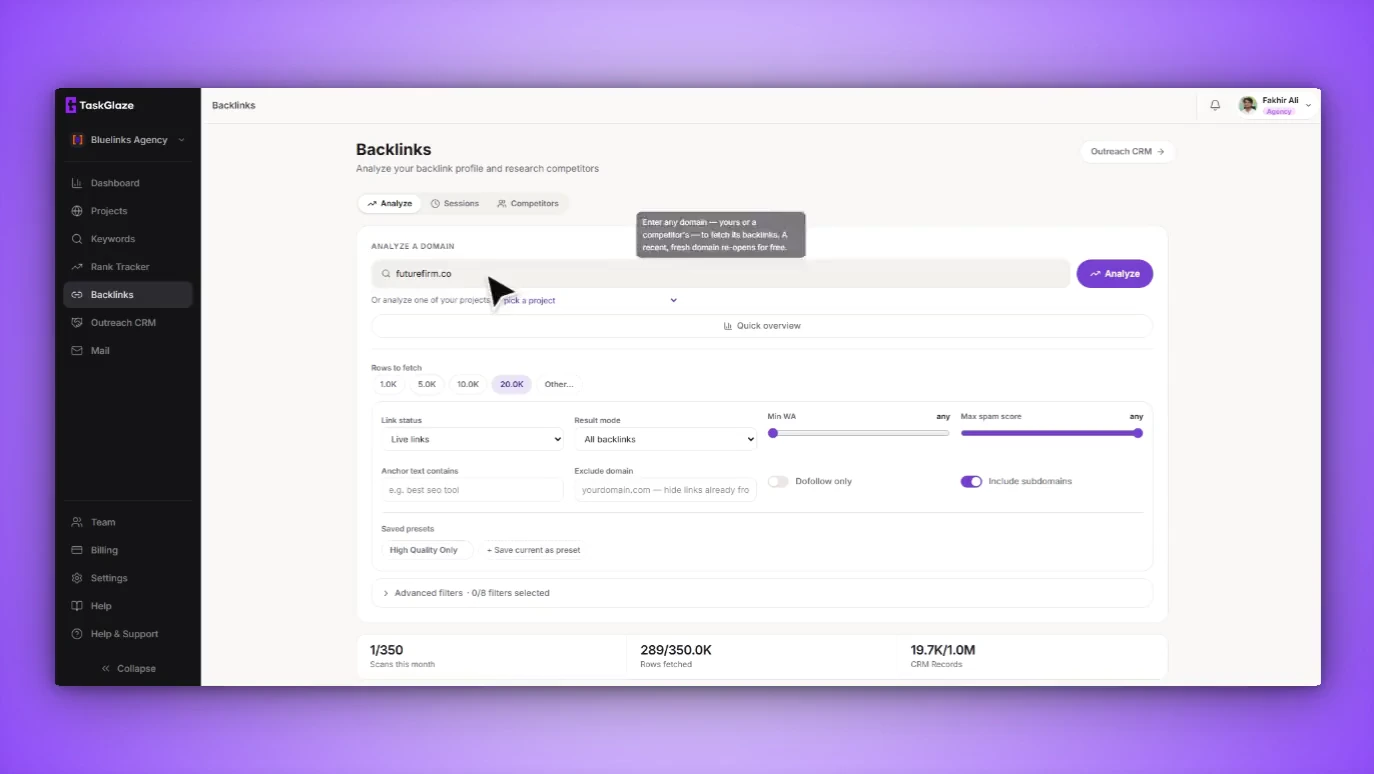
TaskGlaze is built around that unit. Enter any domain, set the filters before the fetch runs — live or lost, dofollow only, a minimum authority, a maximum spam score, an anchor phrase — and what comes back is already the shape you wanted. Then read it four ways: every backlink, by referring domain, by anchor text, and as a gap against your competitors. The rows worth chasing go straight into the outreach CRM.
Backlink Analysis, step by step
Enter a domain
A competitor you found in the results, or one of your own projects from the dropdown. Choosing your own project matters: TaskGlaze then records the links as ones you already have, not prospects to chase.
Filter before you fetch
Link status, one row per domain or per anchor, dofollow only, minimum Website Authority, maximum spam score, anchor phrase, platform and link type, and how many rows to pull. Save the set as a preset for the next competitor.
Read it by domain, not by link
Referring domains collapses duplicates into one row per site with its authority and link count, and marks the ones already in your CRM. Anchors shows each phrase, its link count, how many domains use it and its share.
Compare, then take the gap
Add your own domain and as many competitors as you like to the gap view: one column per party, one row per referring domain. The sites linking to them and not to you stand out — select them and send them to the CRM.
What's included in Backlink Analysis
Authority and spam on every row
Website Authority (0–100) and a spam score on each backlink and referring domain, both sortable, with a filter that hides anything above a spam threshold.
Dofollow, nofollow, live and lost
Follow status on every link, and you can pull the links a domain has lost as well as the ones it holds.
Referring domains, not duplicates
A sitewide footer link counts once, not eight thousand times. Individual backlinks keep their source page, anchor and first-seen date.
Anchor-text distribution
Each anchor phrase with its link count, distinct domains and share — enough to tell a natural profile from a bought one.
A multi-competitor gap view
Compare against any number of competitors at once, with rows already in your CRM flagged so you never chase the same site twice.
Presets and filtered export
Save filter sets and restore them in one click. Export to CSV with your filters applied; exporting reads stored results and never spends a scan.
What it doesn't do
Worth knowing before you sign up.
- The backlink data comes from a licensed third-party index, so a very large site can show fewer links than Ahrefs or Semrush report.
- Scans and rows are monthly allowances per plan. Re-opening a recent result with the same filters is free.
- It shows who links to a competitor, not how they got that link.
Backlink Analysis: common questions
Straight answers. If yours isn't here, ask us and the founder will reply.
A checker hands you a list; this is built for deciding who to email. The filters that matter to link builders are applied to the fetch itself, results roll up by referring domain, and the domains worth chasing move straight into an outreach CRM where TaskGlaze finds and checks the contact address.
No. If you analyzed it recently with the same filters, TaskGlaze reopens the stored results for free. How long results stay fresh depends on your plan, and each saved session shows when it's due for a refresh. Paging and exporting stored results never cost a scan.
You choose the row count, up to your plan's per-scan maximum. Two monthly allowances apply — scans run and rows fetched — and whichever runs out first stops further analysis until the month rolls over. Both are shown in the app as you spend them.
Yes — that's the Competitor gap view. Analyze your own domain once, analyze each competitor, then compare the saved sessions side by side. Every referring domain is a row with a column per party, so the gap is the rows ticked for them and blank for you.
From a live, licensed third-party link index — not a static export and not an index TaskGlaze runs itself. That's what lets backlink data be included in the plan instead of needing a separate Ahrefs or Semrush subscription. It works beside those tools rather than replacing them.
Works with
- Competitor AnalysisEvery rank check records who sits above you on each keyword, for free. A separate Find Competitors run finds the domains whose rankings overlap yours — even before your site ranks.
- Outreach CRMSend the domains worth chasing into a pipeline built for link deals. TaskGlaze finds the contact address and checks it's deliverable before you write a word.
- Backlink TypesEvery prospect is classified by the kind of link it hands out — guest post, niche edit, resource page, HARO and eleven more — so you pitch the ask that site already says yes to.
Choosing between tools? Compare TaskGlaze with Pitchbox, Respona and BuzzStream or see every feature.