Backlink monitoring that proves a link is gone before it tells you
TaskGlaze re-checks every placement on a schedule, confirms a loss in a real browser before reporting it, and tells you exactly what changed and why.
- confirms a loss before it's reported
- Real browser
- named when a check fails
- 16 reasons
- of losses on Starter, Pro and Agency
- Daily digest
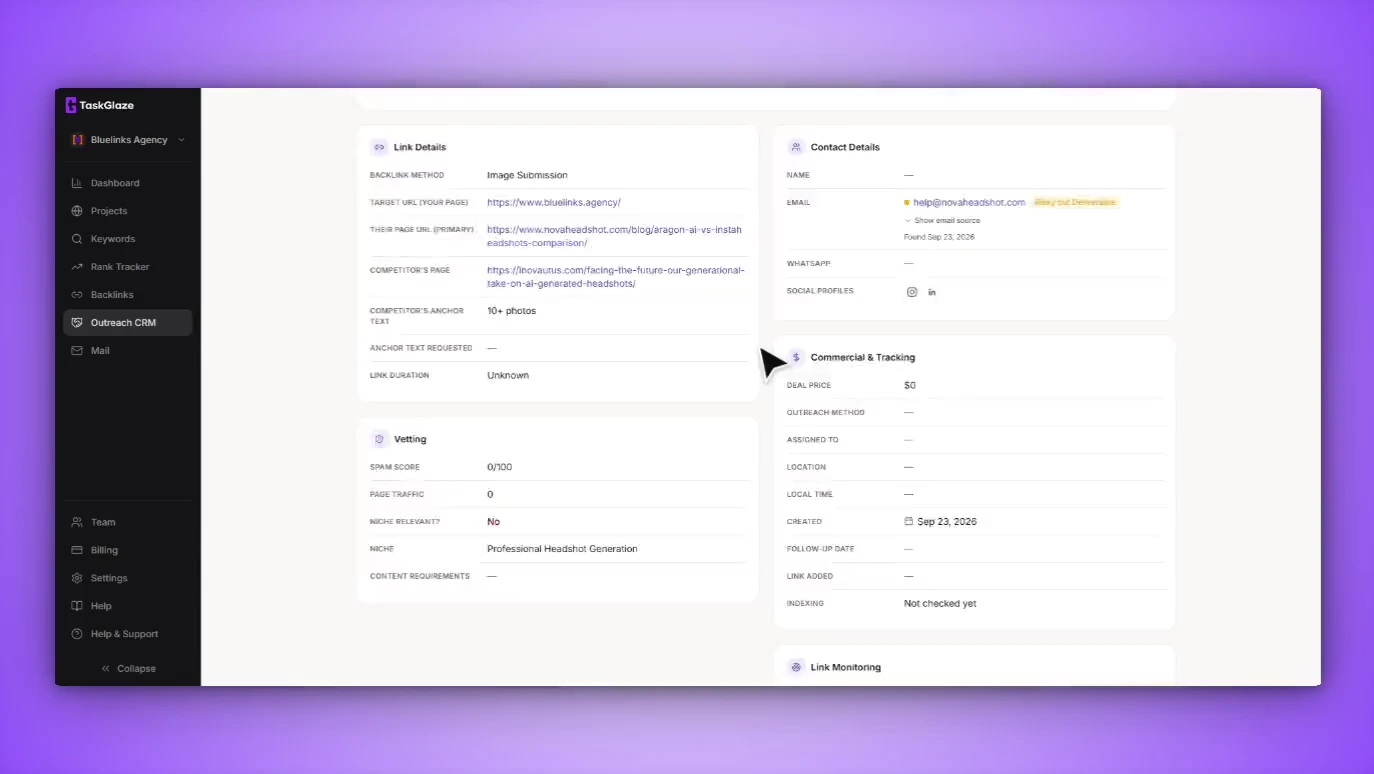
Where Link Monitoring fits
Each step hands its output straight to the next — no exports, no second tool.
A placement isn't finished when it goes live. Links get removed, switched to nofollow or relabelled sponsored, usually without anyone telling you — and a monitor that cries wolf is almost as bad as none.
The hard part isn't fetching the page, it's being right. Many sites sit behind anti-bot walls that serve a challenge page instead of the article; a plain fetch reads that as "no link here". So before TaskGlaze reports a loss, it re-checks through a real headless browser, and a site that keeps failing that way needs ten consecutive failures before the word "lost" is used. You get an alert you can act on instead of one you learn to ignore.
Link Monitoring, step by step
Every placement is its own row
A domain that gave you three links is three tracked placements, each with the live URL, the target it should point at and the anchor — so a domain can be half-live and half-lost without the truth being rounded off.
The page is fetched carefully
Every redirect hop is validated, every link on the page is resolved and compared to your target exactly — scheme, www, trailing slash and query order normalised, redirector links decoded. Exact match, never substring.
If the page fights back, a real browser opens it
Anti-bot interstitials are detected, and whenever a plain fetch is about to conclude your link is gone, the page is rendered in headless Chromium, the challenge is waited out, lazy content is scrolled into view and iframes are read.
You get a verdict and a reason
Live or lost, plus the rel value and anchor it found. A failed check names which of sixteen reasons it was — 404, server error, blocked, rate-limited, anti-bot wall, redirect and more — and how many strikes it has taken so far.
What's included in Link Monitoring
Exact URL matching
A link to /guide-2 isn't your link to /guide; a utm-tagged link to the same page still is. Redirector URLs are decoded so they still resolve to you.
Dofollow, nofollow, sponsored, UGC
All four are classified and changes are flagged. Page-level noindex/nofollow and X-Robots-Tag headers downgrade a dofollow verdict too.
Sixteen named failure reasons
404, 410, server error, block, rate limit, timeout, SSL problem, redirect loop, login wall, anti-bot challenge, JavaScript-only page, link removed and more — each needs a different next step.
Browser confirmation before a loss
No definitive "your link is gone" comes from a plain fetch alone while the renderer is available — 404s and 403s get a render attempt too.
Strike thresholds that fit the failure
A confirmed removal needs two consecutive checks, a routine blip three, an anti-bot wall ten. Checks under six hours apart count once.
Redirects and recoveries tracked
If a placement URL now redirects, you see where. If a lost link comes back, the loss clears properly, so a second drop reaches you again.
What it doesn't do
Worth knowing before you sign up.
- Check frequency depends on the plan: weekly or monthly on Starter and lifetime, up to every 3 days on Pro, daily only on Agency.
- The daily email digest goes to Starter, Pro and Agency. On the trial and lifetime plan, changes show in the app only.
- It watches the placements you track. It doesn't go looking for new backlinks on its own — that's what backlink analysis is for.
Link Monitoring: common questions
Straight answers. If yours isn't here, ask us and the founder will reply.
You choose per prospect from your plan's options. Starter and lifetime: weekly or monthly. Pro and the free trial: every 3 days, weekly or monthly. Agency: daily, weekly, every two weeks or monthly. The automated sweep runs overnight, and you can re-check any placement by hand at any time.
That's what it was rebuilt to stop. A negative result from a plain fetch is re-checked in a real browser before it counts, a genuine removal needs two consecutive checks to agree, an anti-bot wall needs ten, and the app shows progress against the threshold while inconclusive checks build up.
Yes. It records the rel value on every check and classifies it as dofollow, nofollow, sponsored or UGC, and it honours page-level directives — so a page that adds a meta robots nofollow downgrades your verdict even if the link's own rel never changed.
As one daily digest, not one email per link — three drops or a hundred on the same day is one message, with the reason for each. It goes to Starter, Pro and Agency accounts; on the trial and lifetime plan the status and reason are in the app.
One check of one link. A prospect with four monitored placements uses four each time it's re-checked. On Starter, Pro and Agency the allowance refreshes each billing cycle; on the lifetime plan it's a cap on how many links you monitor at once. A manual preview check is always free.
Works with
- Email OutreachConnect your mailbox and send from your real domain. Write each email with AI or a template, run sequences inside a daily cap, and every follow-up stops the moment someone replies.
- Outreach CRMSend the domains worth chasing into a pipeline built for link deals. TaskGlaze finds the contact address and checks it's deliverable before you write a word.
- Backlink AnalysisFilter any domain's backlinks by authority, spam score and dofollow before you fetch, read them by referring domain, and see which sites link to your competitors but not to you.
Choosing between tools? Compare TaskGlaze with Pitchbox, Respona and BuzzStream or see every feature.