Keyword research with search intent on every single result
Real search volume, CPC, competition and difficulty — plus an intent label on every keyword, so you can cut straight to the searches that are ready to buy.
- gets a search intent label
- Every result
- by volume get real keyword difficulty
- Top 300
- a seed keyword or a competitor's domain
- Two ways in
Where Keyword Research fits
Chooses the keywords you track in step 1.
Volume is the easiest metric to find and the easiest to be wrong about. Ten thousand searches that all want a free definition are worth less to a business than four hundred that want a quote.
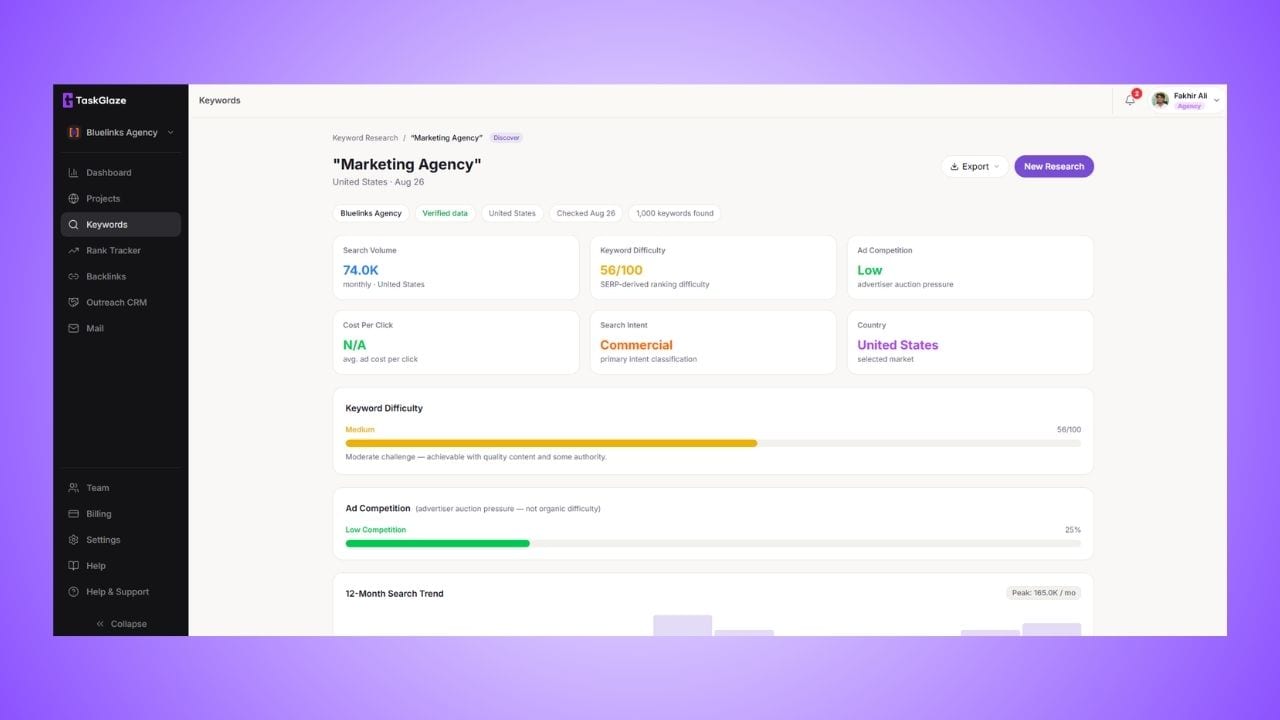
TaskGlaze starts from either end: a seed keyword, or a competitor's domain when you know who you're fighting but not yet what for. Pick the country or city by name. Every result carries real monthly volume, competition, CPC and a trend, plus an intent label — informational, navigational, commercial or transactional — on every row, not a sampled few.
Keyword Research, step by step
Start from a keyword or a competitor
Discover mode takes a seed term and returns the suggestions around it, with a full breakdown of the seed at the top. For-site mode takes a competitor's domain and works backwards from what it's built on.
Real numbers come back
Monthly volume, competition, CPC and trend from Google's own keyword data, with a second provider as automatic fallback. The seed gets the same treatment so you can judge it against its suggestions.
Every result gets an intent label
TaskGlaze's own classifier sorts each keyword into the standard four intents. Because it costs nothing per lookup, it runs on the whole result set. A keyword with no clear signal is labelled informational at low confidence rather than a confident guess.
Save the winners and track them
Save the keywords worth chasing and export them as CSV or a PDF report. The CSV imports straight into the Rank Tracker, so the terms you chose become the positions you watch.
What's included in Keyword Research
Two ways in
A seed keyword when you know the topic, a competitor's domain when you only know the rival. Both return the same result shape.
Intent on every result
Not the top hundred, not behind a second click — every keyword gets a label, so a thousand-row set can be cut to its commercial half in one filter.
Real difficulty where you'll use it
Difficulty is fetched for the top 300 by volume, the page says how many got it, and a keyword with no data stays blank instead of getting an invented number.
Opportunities surfaced
The terms with real volume and the lowest difficulty are picked out, with a breakdown of the set by intent, competition and volume.
Location-aware
Pick the market when you run the research, so the volumes you compare are the ones that matter to you.
CSV or PDF export
This session, your saved keywords or every session on the project. PDF export starts on Starter.
What it doesn't do
Worth knowing before you sign up.
- The intent classifier is English-only and has no brand database, so it spots navigational intent from words like "login", not brand names.
- Keyword difficulty covers the top 300 results by volume, not the whole list.
- There's no one-click send to the Rank Tracker yet — it's a CSV export and import, about a minute.
Keyword Research: common questions
Straight answers. If yours isn't here, ask us and the founder will reply.
Volume, competition, CPC and trend come from Google's own keyword data, with a second provider as automatic fallback. Keyword difficulty comes from a dedicated backlink-index provider, because difficulty needs an authority index. Search intent is classified in-house, which is why it's free and runs on every result.
Difficulty has a real per-lookup cost, so it's fetched for the top 300 results by volume. Some inside those 300 still come back blank — the provider genuinely has no data for them — and they stay blank rather than getting an invented number.
It uses the same four-category model the big tools use, scored from about 150 weighted modifier patterns. Two honest limits: it's English-only, and without a brand database it catches navigational intent from modifiers like "login" or "official site" rather than recognising brand names.
Via CSV, in one import. Export the keywords you saved, then use the Rank Tracker's bulk import to add them with their locations. There's no single button yet — it takes about a minute.
No. Research runs count as keyword lookups; tracked keywords count against the Rank Tracker's own limits. Researching a thousand keywords is one lookup, not a thousand tracked keywords.
Works with
- Rank TrackerName the place, pick desktop or mobile, and TaskGlaze re-checks your Google position on a schedule — keeping every check, so you read a trend instead of one number.
- Competitor AnalysisEvery rank check records who sits above you on each keyword, for free. A separate Find Competitors run finds the domains whose rankings overlap yours — even before your site ranks.
- Site AuditTaskGlaze crawls every page you own, scores each one, and returns the issues that actually cost you rankings — ordered by how many pages they hit, each with the fix.
Choosing between tools? Compare TaskGlaze with Pitchbox, Respona and BuzzStream or see every feature.