A link building CRM with the contact email already found
Send the domains worth chasing into a pipeline built for link deals. TaskGlaze finds the contact address and checks it's deliverable before you write a word.
- from Prospect to Link Received
- 7 stages
- deliverability score on every found email
- 0–100
- per contact found, only when it's new
- ½ token
Where Outreach CRM fits
Each step hands its output straight to the next — no exports, no second tool.
Link building campaigns usually die in a spreadsheet: one tab of domains from a competitor's backlinks, one of guessed addresses, one of who you already emailed — wrong within a week, and none of it can tell you whether an address exists.
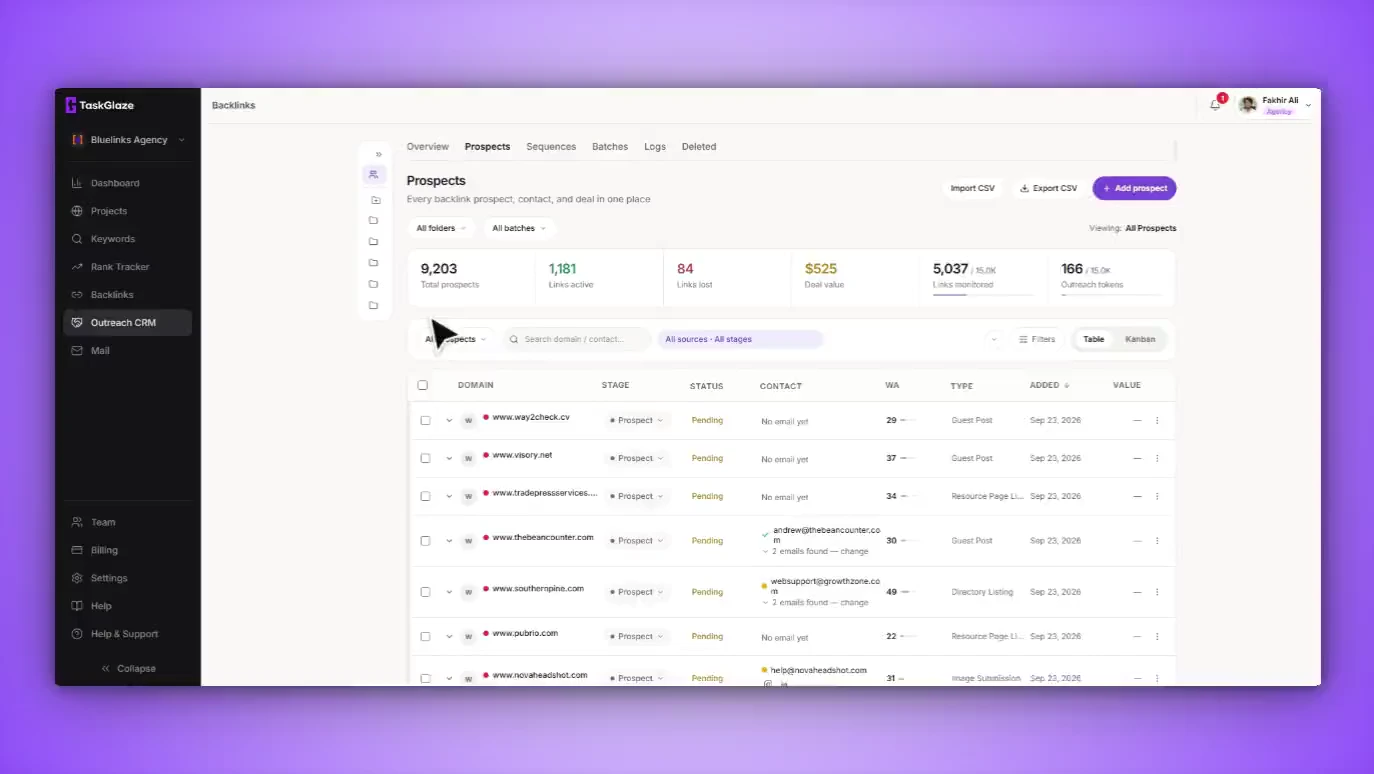
TaskGlaze's outreach CRM is the same workspace as the backlink data that feeds it. The domains you filter out of a competitor's profile arrive as real records — the pages they already link to, a stage, a deal price, a follow-up date and an owner. Then it finds the contact: it crawls the domain for addresses it publishes and runs the strongest through a deliverability check, so the verdict sits next to the email before you send, not after the bounce.
Outreach CRM, step by step
Send domains into the pipeline
Add filtered referring domains in one action. Manual entry, CSV import and direct email prospects land in the same place with the same fields — one row per domain, not one per link.
Let the contact finder do the hunting
Find Contact crawls the domain for published addresses, checks the best candidates for deliverability and saves the strongest with its verdict and score. The other candidates stay in a dropdown with the pages they were found on, so you can pick the editor over the generic inbox.
Work the stages
Move prospects through Prospect, Contacted, Negotiating, Deal Closed and Link Received — with Link Lost and Rejected for the ones that end badly. Deal price, follow-up date, owner, notes and content requirements live on the record, and every change is logged.
Filter to the question you're asking
Who's overdue for a follow-up, which rows have an address worth sending to, which domains sit between two authority scores or deal prices. The list and the export share one filter.
What's included in Outreach CRM
Stages built for link deals
Prospect, Contacted, Negotiating, Deal Closed, Link Received, Link Lost, Rejected — as a table or a kanban board.
A two-stage contact lookup
One service crawls the domain for addresses it publishes; a second checks each strong candidate for deliverability.
A verdict, not just an address
Every found email carries a score out of 100 and a label: Verified, Risky but Deliverable, Low Confidence or Undeliverable. A confirmed rejection from the mail server always wins.
One row per domain, every placement under it
A site linking to a competitor from four pages is one prospect with four placements, each with its own URL, anchor, dofollow status and last check.
Fields that belong on a link deal
Deal price, target URL, requested anchor, link duration, content requirements, follow-up date and assignee — filterable and exportable.
An activity log per prospect
Stage changes, contacts found, notes, placements edited, monitoring switched on — each with who did it and whether it was a person or an automated job.
What it doesn't do
Worth knowing before you sign up.
- It finds addresses the site publishes. When none can be confirmed, the best candidate is kept and labelled low confidence, not shown as verified.
- Gmail and Outlook block direct mailbox checks, so their addresses usually show as Risky but Deliverable.
- Contact finds draw on your plan's finder-token pool — half a token each, and nothing when the prospect already has an email.
Outreach CRM: common questions
Straight answers. If yours isn't here, ask us and the founder will reply.
It finds it. Find Contact crawls the prospect's domain for addresses it publishes, checks the strongest for deliverability and saves the best to the record. Every other candidate stays in a dropdown with the pages it was found on, and once you pick one yourself a later re-run never overwrites your choice.
A deliverability score of 70 or more from a real check — DNS and domain checks plus a direct mailbox probe where the provider allows one. 45 to 69 shows as Risky but Deliverable, which usually just means the mailbox couldn't be probed (Gmail and Outlook block it for everyone). Below 45 is Low Confidence, and a genuine rejection from the mail server is Undeliverable whatever the score.
It comes out of the finder-token pool your plan includes — half a token per find, and only when it establishes an address the prospect didn't already have. Re-running it on a prospect that has an email costs nothing.
Yes. Import a CSV, add domains by hand, or push them from a backlink analysis. Every row becomes the same kind of record, with the same stages, filters and contact finder.
No. It's the same account and project. The domains you filter out of a competitor's backlinks are the rows you work here, and the placements you win are the links the monitoring sweep watches afterwards.
Works with
- Email OutreachConnect your mailbox and send from your real domain. Write each email with AI or a template, run sequences inside a daily cap, and every follow-up stops the moment someone replies.
- Backlink TypesEvery prospect is classified by the kind of link it hands out — guest post, niche edit, resource page, HARO and eleven more — so you pitch the ask that site already says yes to.
- Backlink AnalysisFilter any domain's backlinks by authority, spam score and dofollow before you fetch, read them by referring domain, and see which sites link to your competitors but not to you.
Choosing between tools? Compare TaskGlaze with Pitchbox, Respona and BuzzStream or see every feature.