One task list for every follow-up, step and to-do
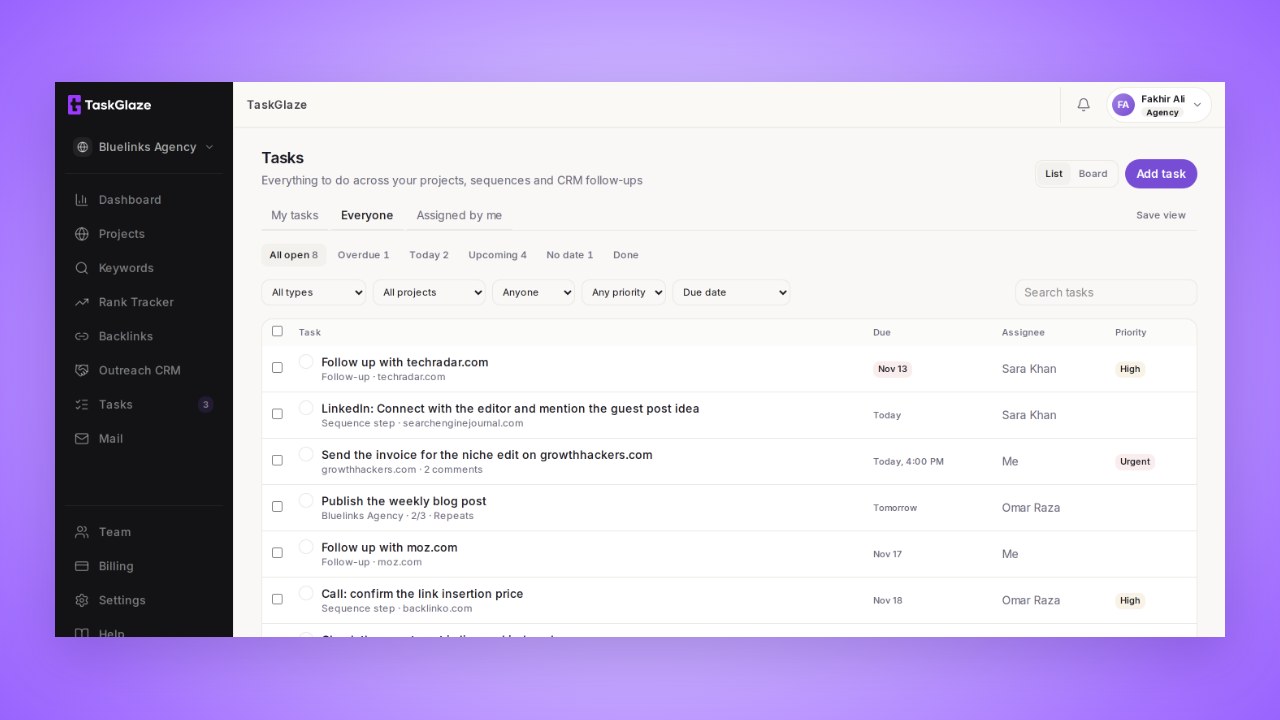
Your own tasks, the manual steps from your sequences and every CRM follow-up date land in one list, sorted by what's due. Assign them, discuss them and tick them off.
- to-dos, sequence steps, follow-ups
- 3 sources
- a morning email in your own time zone
- 8:00
- with saved views and bulk actions
- List or board
Where Tasks fits
Keeps the manual steps and follow-ups between emails from slipping.
Link building is full of small promises. Follow up on Thursday. Connect on LinkedIn after the second email. Check the guest post is live once it's published. Send the invoice. When those live in a notebook, a spreadsheet and three people's heads, they slip, and the deal goes cold.
Tasks puts all of it in one list inside TaskGlaze. Add your own in a few seconds, and the product adds the rest for you: a LinkedIn or call step in a sequence becomes a task when a prospect reaches it, and a follow-up date in the CRM shows up on the day it's due. Finish the task and the sequence moves on, or the follow-up date clears.
Tasks, step by step
Add a task from anywhere
Press T on any page, add one from a prospect's page, or turn an email in the inbox into a task. Give it a due date and time, a priority, a project and someone to own it.
Let the work come to you
Sequence steps that need a person, such as a LinkedIn connection or a call, and CRM follow-up dates join the list on their own, linked to the prospect they're about.
Get reminded, then tick it off
A morning email lists what's due and overdue, and a task with a time gets a reminder an hour before. Mark it done and anything waiting on it carries on.
What's included in Tasks
One list, three sources
Your own tasks, sequence steps and CRM follow-ups, sorted into Overdue, Today, Upcoming and No date.
Built for a team
Assign tasks, see My tasks, Everyone or Assigned by me, and discuss each task in comments with @mentions.
Repeat and break down
Repeat a task daily, weekly or monthly, and split it into a checklist. The next one is created when you finish.
List or board
Filter by type, project, person and priority, save the views you use, and move work across To do, In progress and Done.
Follow-ups stay in sync
Change a follow-up date in the CRM and the task moves. Re-date or finish the task and the CRM updates.
Emails you control
Assignments, mentions, due-soon reminders, an 8:00 summary and a Monday team report, each with its own switch.
What it doesn't do
Worth knowing before you sign up.
- Task emails are included with paid plans and the trial. In-app notifications work on every plan.
- The free plan can view tasks but not create or change them.
- Tasks stay inside your workspace. There's no calendar sync yet.
Tasks: common questions
Straight answers. If yours isn't here, ask us and the founder will reply.
Where do tasks come from?
Three places. You add your own. A sequence step set to LinkedIn, call or another manual action becomes a task when a prospect reaches it. And any prospect with a follow-up date in the CRM gets a follow-up task for that day.
What happens when I finish a sequence task?
That prospect moves on to the next step of the sequence straight away. If they reply before you get to it, the task is cancelled for you, so you never chase someone who already answered.
Can I assign tasks to my team?
Yes. Assign a task to anyone in your workspace. They get an email unless they've switched it off, and you can discuss the task in comments and @mention people. Owners and admins see every task.
Which emails will I get?
You choose. There's a switch for each: tasks assigned to you, comments and mentions, due today and due soon, overdue, the next three days, tasks your team finishes, and a Monday summary for the workspace owner. The morning email arrives at 8:00 in your time zone and only on days with something on your list.
Is Tasks included in my plan?
Yes. Tasks is part of every paid plan and the free trial, with no limit on the number of tasks.
Works with
- Email OutreachConnect your mailbox and send from your real domain. Write each email with AI or a template, run sequences inside a daily cap, and every follow-up stops the moment someone replies.
- Outreach CRMSend the domains worth chasing into a pipeline built for link deals. TaskGlaze finds the contact address and checks it's deliverable before you write a word.
- Link MonitoringTaskGlaze re-checks every placement on a schedule, confirms a loss in a real browser before reporting it, and tells you exactly what changed and why.
Choosing between tools? Compare TaskGlaze with Pitchbox, Respona and BuzzStream or see every feature.